Customizing your sales grids has never been easier! Easily add new columns (more than 40 fields available - including payment method, shipping method, items ordered, tracking numbers and many more), hide unnecessary columns and change column positions in the Sales > Orders, Invoices, Shipments and Credit Memos grids using the Enhanced Order Grid extension by XTENTO.
This extension allows you to customize all sales grids (Orders, Invoices, Shipments, Credit Memos) on a per-role base. You can set up different grid layouts for each administrator role and thus provide a different order view for your warehouse employees for example. Add any columns required, including billing/shipping/payment information, items purchased (including thumbnails), and many more. Removing, renaming and re-positioning columns in grids is possible as well.
Take control over all sales grids: Add custom fields, remove columns, as well as re-order columns
Features
Take full control over all sales grids
Add more than 40 new columns/fields to all sales grids. This includes fields such as billing/shipping/payment information, items purchased (including thumbnails), and many more. See below for a list of all fields.
Adjust columns & customize grid appearance
Hide columns in sales grids - easily remove any column not required. Change the position of columns in grids. Rename new and existing columns.
All columns are fully customizable
Set up different grid views for different admin roles
Want your warehouse team to see specific columns in the Sales > Orders grid only? Not a problem - simply set up a separate grid view for the warehouse admin role and they'll only see the fields you configure.
Set up as many different grid views as required
All sales grids are customizable
Sales > Orders
Sales > Invoices
Sales > Shipments
Sales > Credit Memos
Show purchased items directly in the grid
Add the "Purchased Items" column to your Sales > Orders grid and easily see which items have been purchased, including the selected custom options as well as a thumbnail of the product purchased. It is also possible to specify a list of custom product attributes to be shown.
Item details/columns can be customized. Check out the demo.
New columns support filtering - find orders by SKU in the grid
Almost all new columns support filtering (see below for list of fields/notes). Easily search all orders for orders of a specific product/SKU, for example.
Advanced Filters
Filter and hide certain order statuses for specific admin roles
Filter and hide store views for specific admin roles
Fields that can be added to sales grids
The following fields can be added to the Sales > Orders grid:
Order #, Invoice #, Shipment # and Credit Memo # as filterable columns
Order information: Coupon Code, Subtotal, Tax Amount, Discount Amount, Order Weight
Item information: A column containing all items purchased (including custom options and thumbnails) can be added to the grid.
Tracking information: Show tracking numbers/carriers for created shipments (not searchable)
NEW: Show data from third party extensions on the Sales > Orders grid: eBay User ID + E-Mail (M2ePro), Order Source (M2ePro), Amazon Order # + E-Mail + Buyer Name (M2ePro), OneStepCheckout Customer Comment, GoMage Checkout Comment, AITOC Delivery Date, AITOC Delivery Comment, and many more.
Columns for other grid types vary. Custom fields can be added as well, check out the guide in our wiki. Looking for other fields, for example from third party extensions? Contact us before your purchase, we'll be happy to discuss.
Watch the video: Extension Walkthrough (2 min)
Columns added to the grids will also be exported using the standard/built-in export functionality of Magento. However, this extension does NOT customize the Magento-default export format. If you are looking for custom CSV/XML/Excel exports, check our Order Export Module instead.
Frequently Bought Together
Tired of processing orders manually? Process orders in batches! Check out our Simplify Bulk Order Processing extension if you want to process orders directly from the Sales > Orders grid in batches. No need to open orders individually anymore - simply invoice/ship/email/change the order status directly from the grid.
With this extension we can see the products in the order and we can do it without having to open the order. Saves a lot of time!
Installation without problems and everything works as expected.
Perfect extension to assist with the daily operations. Does what it says and should become an essential extension for Magento.
What sets this apart is the easy installation and well thought our configuration all backed up fantastic support....
All extensions were built by Magento Certified Developers. Our extensions are not encrypted (no IonCube, Zend Guard, etc.) and not obfuscated. 100% of the extension source code is "open source" and not a single line of code is obfuscated / encrypted.
Easy to install & instant download after your purchase. Detailed installation instructions as well as troubleshooting guides can be found in our Support Wiki.
This extension is available for Magento 1 and both Community Edition (Open Source) as well as Enterprise Edition (and Cloud & Commerce) are compatible. The Magento 1 version of this extension is also compatible with Magento 1 environments that use OpenMage (LTS). The extension is multi-store compatible and supports Magento instances with multiple websites/stores/store views. All XTENTO extensions are guaranteed not to conflict with each other.
Your purchase includes free development/staging/testing license keys. The license key check in the module works offline, and does not connect to the internet (server-side) to validate the license key.
In case there are any questions or doubts about conflicts/functionality, please do not hesitate to contact us. We will be happy to provide assistance.
We offer a broad range of services that can be added to your order. Don't want to deal with installation or configuration yourself? Our support staff will be happy to help.
Extended Configuration Support: Want us to make the initial configuration of your purchased extension? Or simply know you'll need configuration/customization time? Then you'll want to add this service to your order. (Contact us before your purchase to discuss exact scope of work and whether it is covered by this service)
 Magento 1
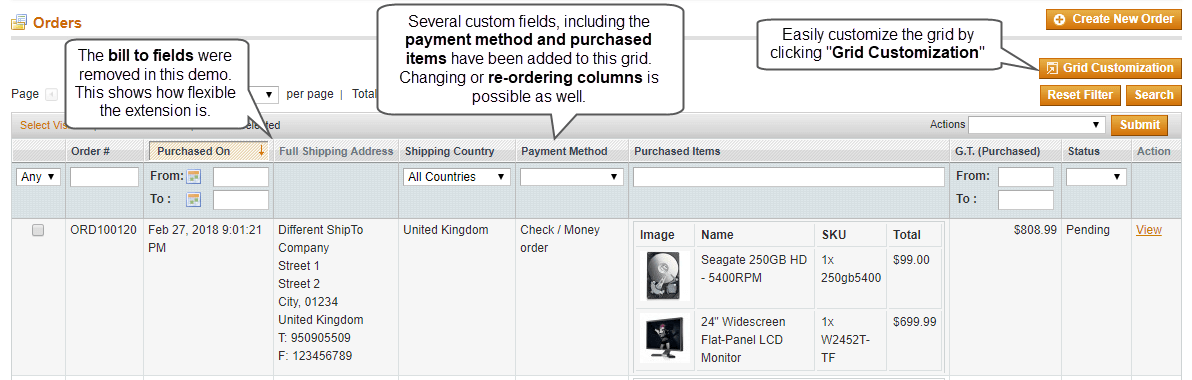 Take control over all sales grids: Add custom fields, remove columns, as well as re-order columns
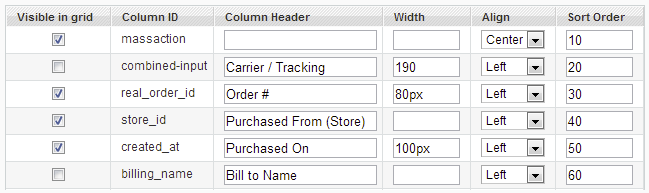 All columns are fully customizable
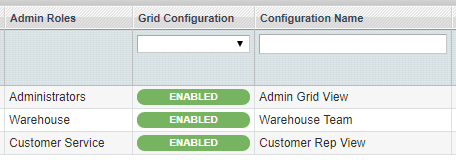 Set up as many different grid views as required
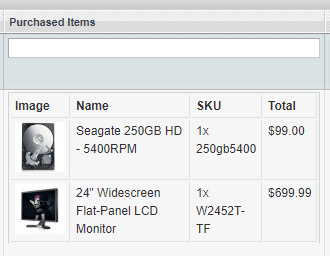 Item details/columns can be customized. Check out the demo.


