Advanced Order Status was added to your shopping cart.
Hide Price & Call For Price
Extension Available for:
Magento 2
6 months support
Certified developers
Composer Repository (M2)
Code not encrypted
Hide product prices, disable add to cart functionality for specific categories/products, or even completely disable customer/shopping cart features in your Magento 2 store. Make your customers call for pricing information. Configurable on a per customer group and store-view level. Flexible, configurable from the backend and with support for custom themes.
This extension allows you to take full control over price display settings and add to cart functionality. With all details being configurable and fine-grained settings, enforcing pricing policies has never been easier. You can disable add to cart functionality and/or hide prices for certain categories, products or customer groups on a per-store view level. Set up category X to hide product prices, or configure category Y to disable "Add to Cart" functionality for all products in that category. Flexible, powerful and easy to use.
The most powerful and flexible combined Hide Price, Call For Price and Not 2 Order extension available
By combining three features - hide price, call for price and not to order - in one product, this extension will allow you take full control over price display and add to cart functionality in your Magento 2 store.
Disable "Add to Cart" functionality on category and product pages
Don't want your customers to buy a specific product (or all of your products) just yet? Simply disable "Add to Cart" on a per-product, per-category or per-customer group level.
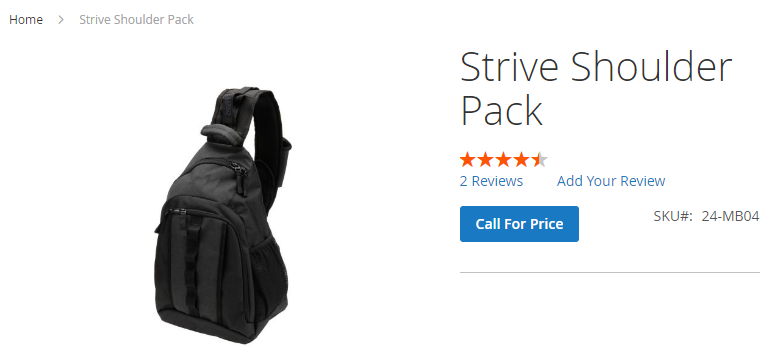
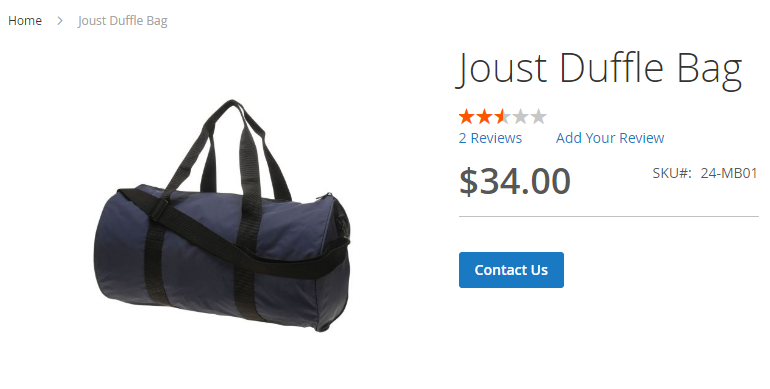
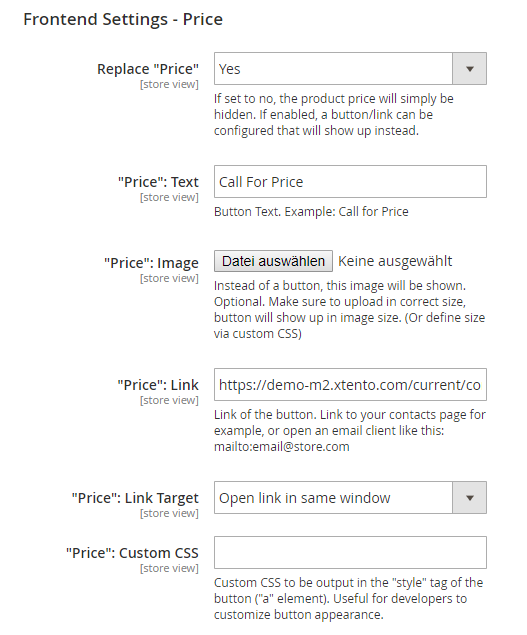
Show (or hide) the price and disable "Add to Cart", and instead replace it with a button/link
Hide product prices for certain customer groups (e.g. guests) and force them to register
Increase customer engagement and have your customers call you to inquire about the price of a product. Or, hide prices for not logged in customers and force them to create an account.
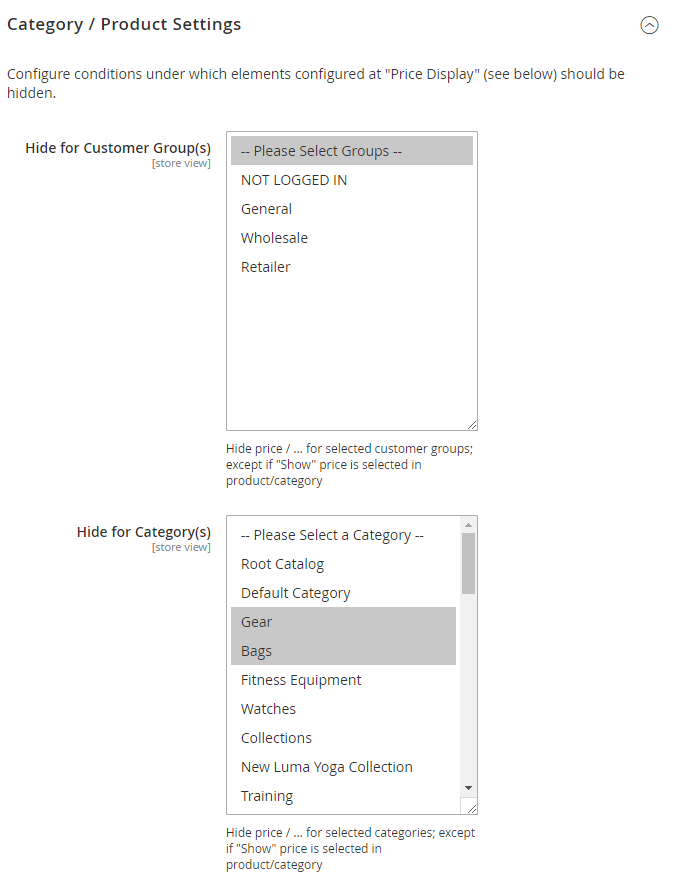
Hide price/add to cart on a per-customer group level
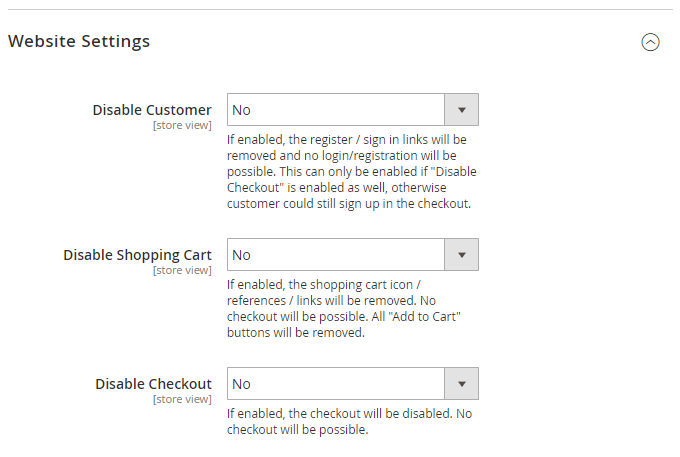
Ability to disable customer registration, shopping cart and checkout entirely
Don't want guests to place orders? Or to register at all? Simply disable customer registration, shopping cart and/or checkout in your store. Allow checkouts only for certain customer groups.
Disable customer/shopping cart/checkout functionality in Magento 2 from the backend
Implement "Call for Price" and "Not to Order" functionality in Magento 2
Hide product prices on category and product pages and just everywhere else in the frontend. Fine-grained settings allow you to configure price display/add to cart settings on a per-store, per-product, per-category and per-customer group level.
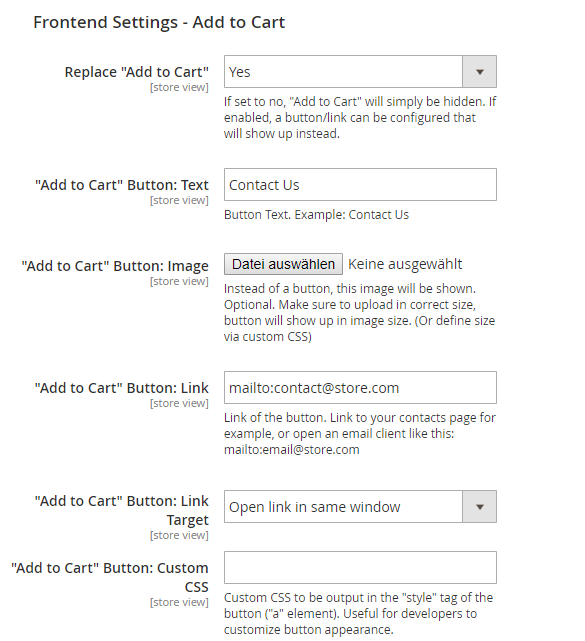
Replace price/add to cart with customizable buttons/text/custom images
Want to show a button instead of the price and/or add to cart? Buttons are fully customizable: Text, Link, Image, Custom CSS to change styling. Easily set up a link to your contact form or a special CMS page.
Easily implement "Call for Price" functionality by hiding price/add to cart
Category View with "Call for Price" enabled
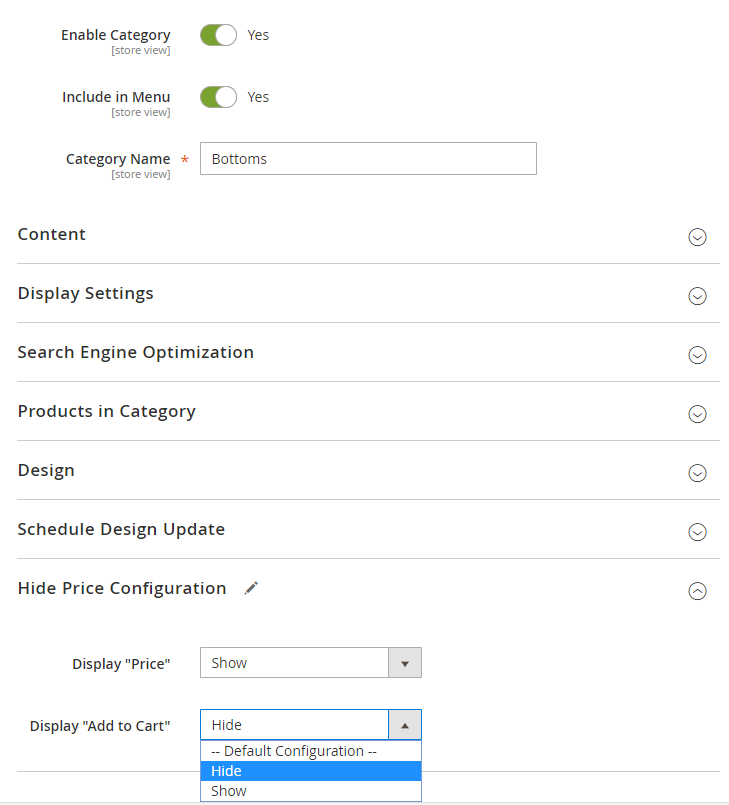
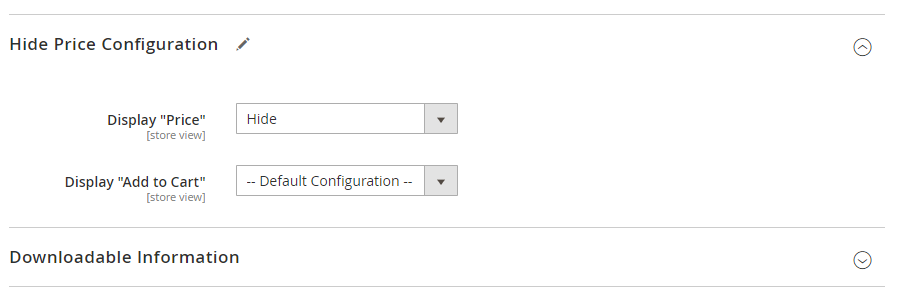
Configurable on a per-store view, customer group, category and even product level
All settings can be made from within the Magento backend. You can either disable add to cart/hide prices for all your products, or just specific categories/products/customer groups. Easily override settings for each category/product: Hide or show product prices/add to cart for certain categories/products. It's easy.
These settings can be overriden on a per-category/per-product level
Import / Export "Hide Price" Attribute
The "Hide Price" attributes on category/product level are normal Magento attributes. You can import/export them using the Magento built-in import/exporter.
Frontend / Demo
Frontend Demo (feel free to change settings in backend & watch changes in frontend): Click here
Product View: Add to Cart is disabled and is replaced with a customizable button, price is shown. All configurable per category/product and via global settings on customer group/store view level.
Category View: Call For Price extension and disable add to cart enabled; add to cart button is replaced with a customizable button.
Frontend: Checkout functionality can be disabled entirely, checkout links are removed.
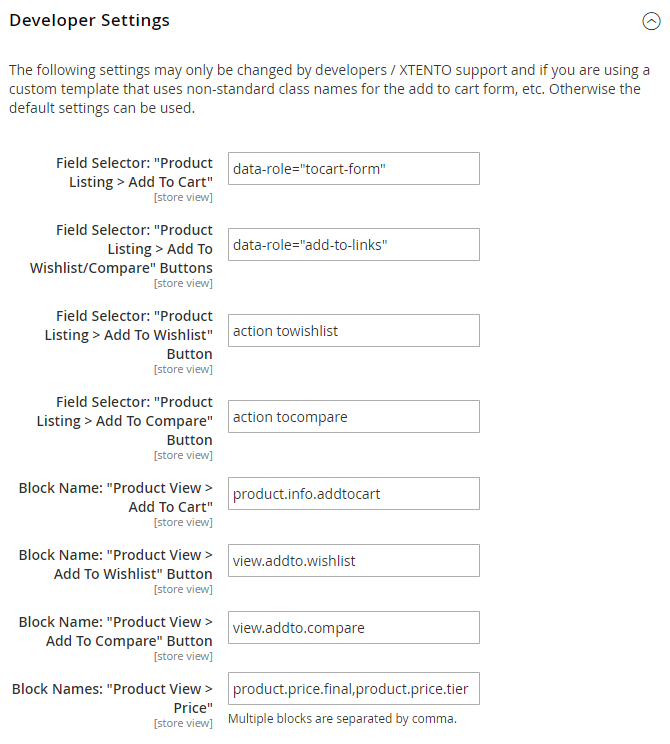
Note: Please note that highly customized themes sometimes require customizations, especially if the theme uses custom blocks/HTML to output prices/add to cart. These customizations are not included and will need to be done by a developer. Also, this extension is not compatible with PWA frontends.
All extensions were built by Magento Certified Developers. Our extensions are not encrypted (no IonCube, Zend Guard, etc.) and not obfuscated. 100% of the extension source code is "open source" and not a single line of code is obfuscated / encrypted.
Easy to install & instant download after your purchase. Our Magento 2 extensions can be installed easily via our composer repository. Detailed installation instructions as well as troubleshooting guides can be found in our Support Wiki.
This extension is available for Magento 2 and both Community Edition (Open Source) as well as Enterprise Edition (and Cloud & Commerce) are compatible. The extension is multi-store compatible and supports Magento instances with multiple websites/stores/store views. All XTENTO extensions are guaranteed not to conflict with each other.
Your purchase includes free development/staging/testing license keys. The license key check in the module works offline, and does not connect to the internet (server-side) to validate the license key.
In case there are any questions or doubts about conflicts/functionality, please do not hesitate to contact us. We will be happy to provide assistance.
We offer a broad range of services that can be added to your order. Don't want to deal with installation or configuration yourself? Our support staff will be happy to help.
Extended Configuration Support: Want us to make the initial configuration of your purchased extension? Or simply know you'll need configuration/customization time? Then you'll want to add this service to your order. (Contact us before your purchase to discuss exact scope of work and whether it is covered by this service)
 Magento 2
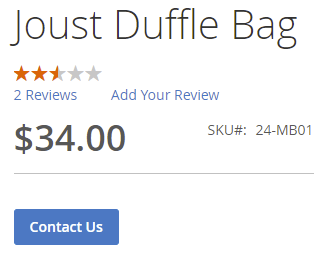 Show (or hide) the price and disable "Add to Cart", and instead replace it with a button/link
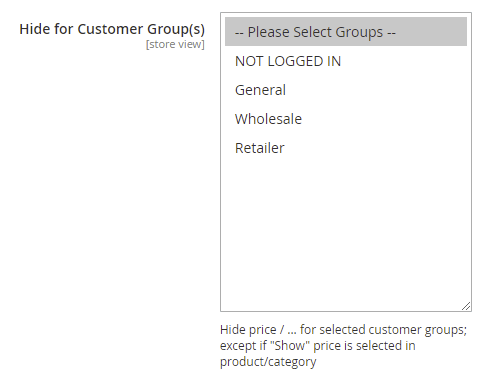 Hide price/add to cart on a per-customer group level
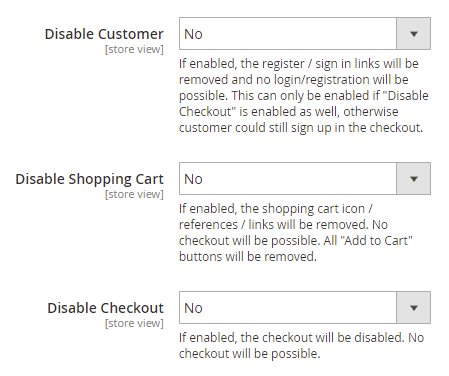 Disable customer/shopping cart/checkout functionality in Magento 2 from the backend
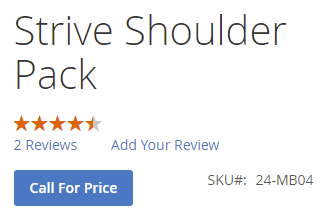 Easily implement "Call for Price" functionality by hiding price/add to cart
 Category View with "Call for Price" enabled
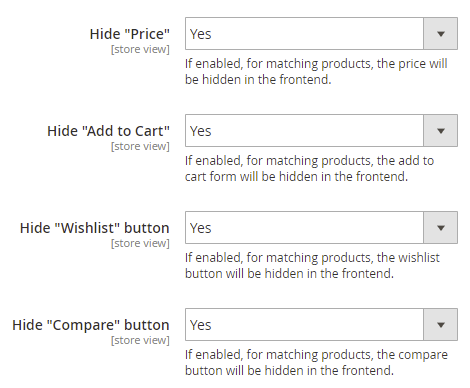 These settings can be overriden on a per-category/per-product level
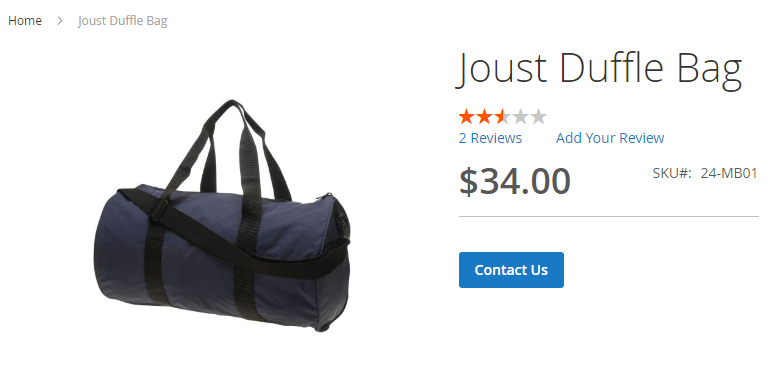 Product View: Add to Cart is disabled and is replaced with a customizable button, price is shown. All configurable per category/product and via global settings on customer group/store view level.
 Category View: Call For Price extension and disable add to cart enabled; add to cart button is replaced with a customizable button.
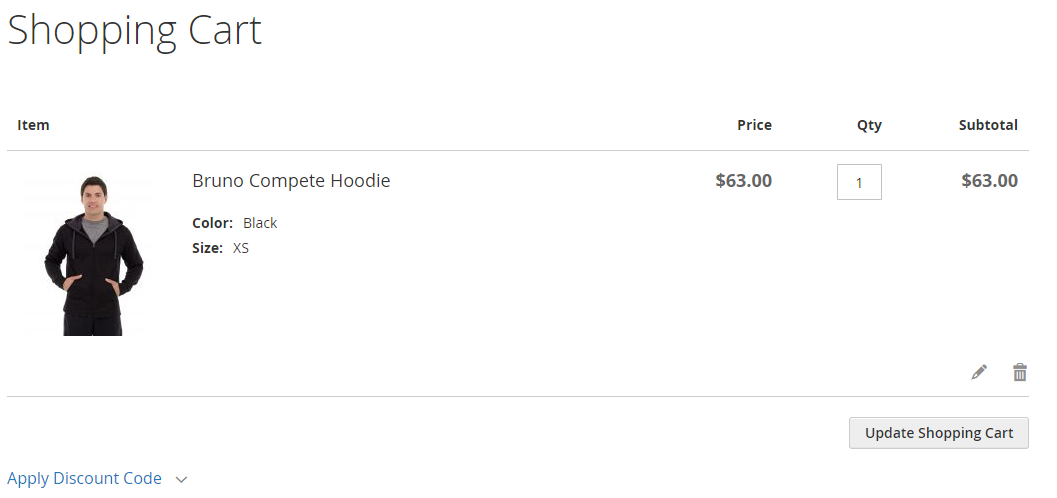 Frontend: Checkout functionality can be disabled entirely, checkout links are removed.